Higgsfield Presets
AI Video Verified- Entry paid tier Entry paid tier Open API motion
- $9/mo $9/mo ~$0.04/pass
- Basic 120 cr (~24 image swaps) $108/yr flat (~24 swaps/mo) Pay-per-run motion endpoints
- Best value tier Best value tier 1080p Earth Zoom
- $49/mo $29/mo 45 cr
- $39 mo 1, 1,000 cr (~40 zooms) Billed $348/yr, 1,000 cr/mo 5s Earth Zoom at 1080p
- Real unit cost
- ~25 cr
- 720p Earth Zoom (45 at 1080p)
Viral templates like Earth Zoom Out, AI Face Swap, and precision Motion Control drive thousands of creators into Higgsfield AI every month, yet template buttons hide wildly uneven credit burn underneath. Checked against live workspace plans on 2026-11-14, a single misconfigured 1080p motion retry can burn 10x as many credits as an image face swap.
Estimate exact monthly credit demand for swappers and camera templates using the Higgsfield Credits tab inside our AI cost calculator, and see our testing methodology for how retake budgets are calculated.
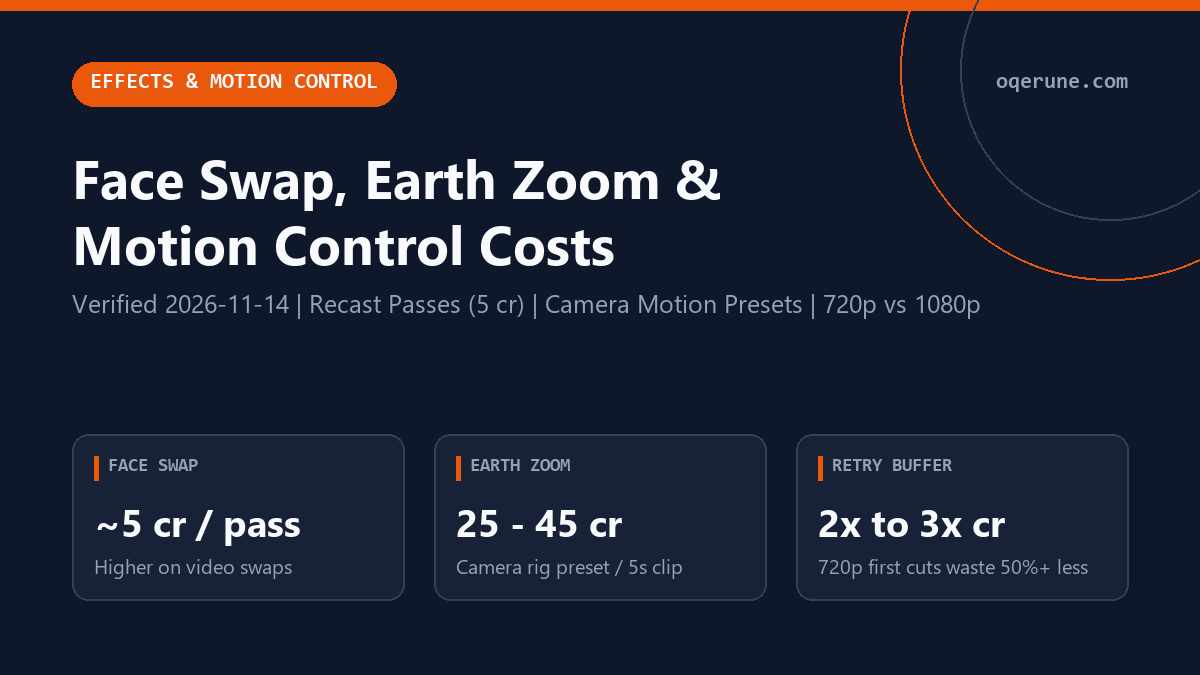
Higgsfield Face Swap vs Earth Zoom Out vs Motion Control costs
Treat every preset as a multiplier over its base image or video model. Lightweight single-frame swaps burn single-digit credits, whereas camera sweeps combining keyframe depth interpolation with Seedance 2.5 or Kling 3.0 physics burn 25 to 60 credits on each attempt.
| Higgsfield preset workflow | Underlying pass type | Typical credit burn per pass | Recommended starter plan | Biggest source of wasted credits |
|---|---|---|---|---|
| AI Face Swap (Image / Recast) | Portrait reference transfer onto generated or uploaded frame | ~5 credits per pass | Basic ($9, 120 cr = ~24 swaps) | Low-res or side-profile source selfies forcing 3x to 4x re-rolls |
| AI Video Face Swap | Temporal frame tracking over 5s clip via Kling or Recast pipeline | ~30 cr (720p) to ~60 cr (1080p) | Plus ($39 intro / $29 annual, 1,000 cr) | Fast head turns or glasses reflections breaking identity mid-clip |
| Earth Zoom Out | Continuous multi-scale aerial pull-back camera preset | ~25 cr (720p) to ~45 cr (1080p) | Plus (1,000 cr) or Ultra 3K (3,000 cr) | Running final 1080p renders before checking start-frame architectural prompt alignment |
| Motion Control Camera Rigs | Orbit, dolly-in, crash zoom, bullet time, or custom trajectory curves | ~25 to 45 cr (Cinema/Seedance); up to 60 cr (Kling 3.0/4.0) | Plus (1,000 cr) + promo 720p Unlimited | Chaining two conflicting camera moves (e.g. fast orbit + dolly zoom) in one prompt |
How to set up Earth Zoom Out without burning Plus credits
Higgsfield AI Earth Zoom Out starts from a tight street or rooftop frame and pulls the virtual camera smoothly past rooftops, city grids, clouds, and orbital curvature inside a single 5-second transition. Because spatial scale shifts by orders of magnitude every 15 frames, weak input framing causes sudden warping around the two-second mark.
Three practical habits keep Earth Zoom Out render costs predictable:
- Supply an uncropped vertical or 16:9 landmark frame generated with Nano Banana Pro (~2 credits) or Soul V2 portraits so clean sky geometry sits above the subject before animation begins.
- Run your first motion check at 720p (cutting credit cost roughly in half vs 1080p) and avoid triggering 2x to 3x parallel queues until the pull-back horizon stays straight.
- Keep camera instructions focused on Earth Zoom Out alone instead of adding secondary pans or crowd action that force extra retries.
Motion Control vs Kling 3.0 & Face Swap retry math
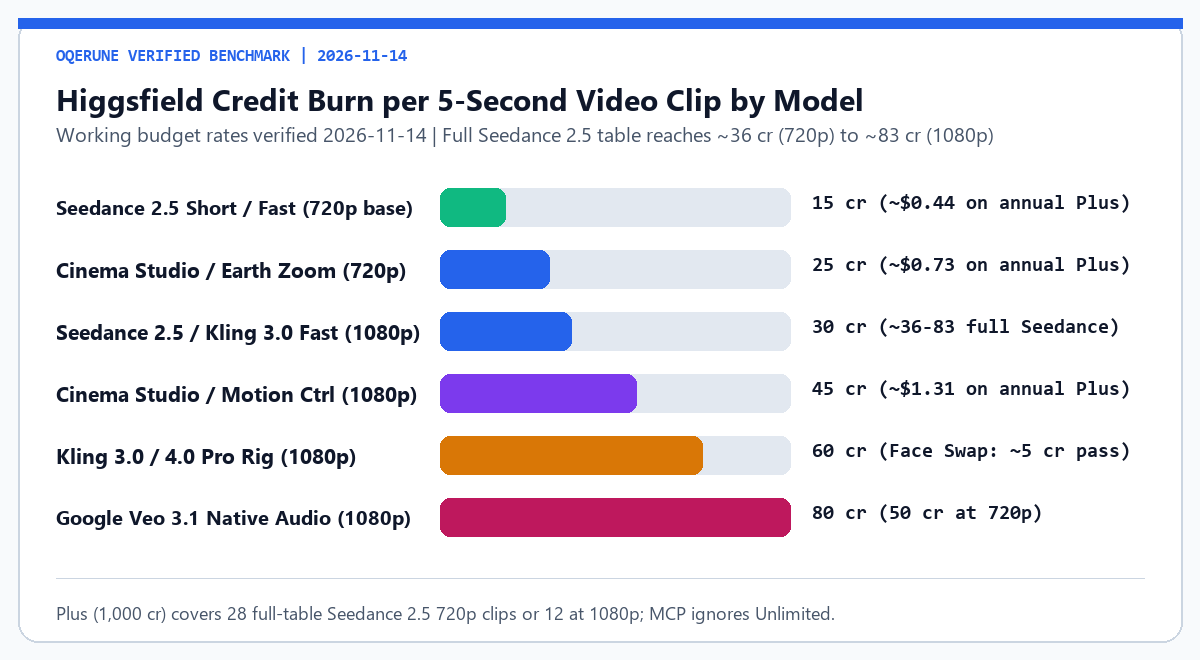
Realistic creator budgets always factor a 2x or 3x retry multiplier on top of advertised base prices. A single 5-second Kling 3.0 / 4.0 action clip or video Face Swap at 1080p costs around 60 credits per render. If three attempts are needed to fix hand placement or lighting flicker, that single finished scene consumes 180 credits, already exhausting 1.5x of the entire $9/mo Basic tier (120 credits).
On a $39 intro ($49 renewal, $29 annual) Plus plan with 1,000 monthly credits, testing at 720p first (~25 to 30 credits) leaves enough room for 15 to 20 kept shots across a campaign even with a 2x retry rate. And when Plus seasonal Unlimited promo windows are active inside the standard web interface (7 to 14 days for Seedance 2.5 depending on monthly vs annual billing), move exploratory Motion Control drafts into the slower Unlimited queue and reserve paid fast credits for final hero shots or Kling 4.0 and Veo 3.1 flagship scenes.
Does Face Swap or Motion Control work better on alternatives?
Higgsfield remains tough to beat when you want camera presets (Earth Zoom Out, bullet time, dolly zoom) paired tightly with Nano Banana Pro stills inside one dashboard. Even so, creators focused purely on low-cost B-roll without presets save noticeably elsewhere: direct Kling AI Pro (~$32.56/mo) delivers 3,000 monthly credits with standalone Motion Brush controls, and Runway Gen-4.5 ($35/mo Pro) adds Director Mode camera sliders plus native 4K upscaling.
If occasional campaigns mean monthly Higgsfield credits go unused, recall that individual credits vanish every 30 days on Free through Ultra 9K. Check every tier limitation and cancellation date inside our Higgsfield promo code and billing guide or browse seven rivals inside Higgsfield alternatives before choosing a subscription.
Dial in exact Face Swap passes, Earth Zoom shots, and 2x to 3x retry buffers inside the Higgsfield Credits tab of our AI Cost Calculator, then check live Free vs Plus availability on Higgsfield AI.
Frequently asked questions: Face Swap, Earth Zoom, and Motion Control
Is Higgsfield AI Face Swap free to try?
You can open a $0 Higgsfield Free account without a credit card to inspect selected starter workflows (limited to 1 concurrent job and 1 Character run), though ongoing Face Swap batches require paid Basic ($9, 120 cr) or Plus ($39 intro / $29 annual, 1,000 cr) balances.
How many credits does Higgsfield Earth Zoom Out cost per clip?
Expect ~25 credits at 720p and ~45 credits at 1080p per 5-second Earth Zoom Out attempt on Cinema/Motion engines, or ~36 to 83 credits when rendered through full-table Seedance 2.5 presets.
Why do Motion Control presets burn credits faster than static prompts?
Motion Control adds spatial camera trajectories (dolly, orbit, whip pan, crash zoom) and longer 1080p motion passes. At 2x to 3x retries to clean up edge warping, each keeper clip effectively uses 50 to 135+ credits unless you block early takes in 720p.
Can I run Kling Motion Control directly without Higgsfield?
Yes. Subscribing directly on Kling AI (~$8.80 Standard or ~$32.56 Pro) includes native Motion Brush and camera controls without paying for bundled Nano Banana Pro or Seedream tools.
What happens if a Higgsfield Face Swap or Earth Zoom render glitches?
Credits spent on completed server renders are deducted even when artifacts appear, which is why testing single-frame alignment at ~2 to 5 credits and checking 720p video passes first prevents burning Plus or Ultra balances prematurely.
Compare full multi-model tier math inside our Higgsfield AI pricing review or explore workflow automation rules in our Higgsfield MCP setup guide.