Canva AI Video
AI Video Verified- Free sandbox tier Free asset watermarks Shared AI quota
- $0/mo $0/mo Shared
- ~5 starter runs lifetime (no reset) Watermarks on Pro media assets Voice, image & video share quota
- Pro monthly tier Pro annual tier Business team tier
- $18/mo $12/mo $25/user
- Pro: ~200 Premium or ~20 Ultra Billed $144/yr US Pro (10x AI quota) Business ($20.83/mo yr = $250/yr)
- Real unit cost
- ~20 Ultra
- Monthly Ultra AI clip ceiling on Pro
Many social teams upgrade to Canva Pro expecting unlimited AI video clips inside Magic Studio, only to hit a monthly usage wall mid-campaign. Because Canva splits generative actions across shared Premium and Ultra monthly buckets, short AI video scenes drain creative allowances quickly.
All US subscription rates and Magic Media limits below reflect live canva.com checks verified on 2026-11-13. For voice synthesis character block caps inside Canva, read our separate Canva AI voice generator guide or compare standalone engines in our AI video generator comparison.
Canva Free vs Pro limits for Magic Media AI video
Canva divides AI actions into standard photo edits (generally governed by fair use on paid tiers) and heavy Premium/Ultra generations such as Magic Media video and Dream Lab image sets.
| Canva plan | US list pricing | Magic Media AI video quota | Built-in timeline perks & limits |
|---|---|---|---|
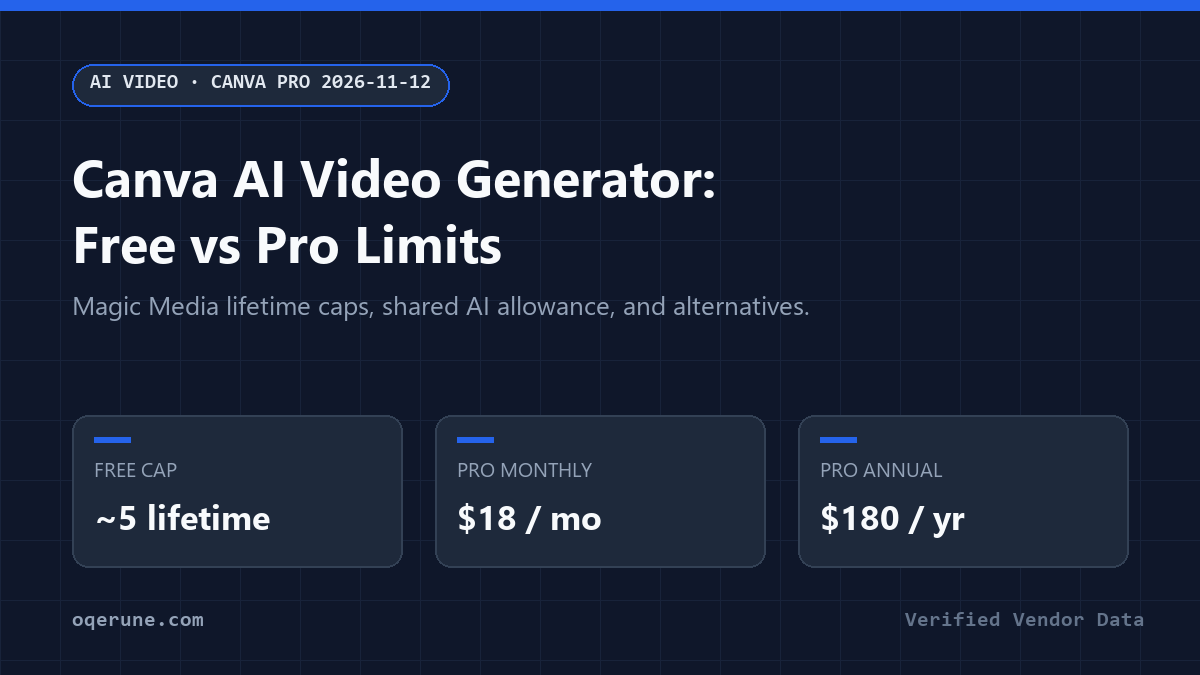
| Free | $0 (1 user, 5 GB storage) | Strict lifetime cap (~5 starter video runs total; never resets) | Basic templates; watermark checks on premium stock media |
| Pro | $18/mo monthly ($12/mo annual = $144/yr, -33%) | Shared monthly allowance (~200 Premium or ~20 Ultra AI runs/mo; AI Pass expands 40x) | Background remover, instant resize, 100 GB storage, single-user license |
| Business | $25/user/mo monthly ($20.83/user/mo annual = $250/yr; AI Pass 20x quota) | Expanded team monthly AI pools + admin brand approvals | Multi-user workspaces, centralized brand kits, shared templates |
How Canva’s Ultra AI video quota catches social teams off guard
On Canva Free, once your ~5 lifetime Magic Media video runs are gone, AI video locks out permanently unless you subscribe. Stepping onto Canva Pro refreshes monthly capacity across roughly 200 Premium uses or 20 Ultra AI actions (including Google Veo and heavy Magic Media video scenes), which translates to just a handful of 4s to 8s video clips whenever retakes miss.
Every completed render deducts from that shared pool whether you publish or delete the shot, so generating raw B-roll inside specialized engines before importing clean MP4 files into Canva protects your budget.
Where Canva wins vs where dedicated AI video pulls ahead
Keep Canva Pro for resizing vertical Reels and Shorts, animating dynamic captions, syncing licensed audio, and coordinating client templates. Single-seat Pro plans ($18/mo monthly, $12/mo annual = $144/yr) simplify post-production when marketers already build thumbnails, slide decks, and social carousels inside one dashboard. Collaborating with an editor or brand manager forces stepping up to Canva Business ($25/mo monthly or $20.83/user/mo annual at $250/yr) to share Brand Kits and approval workflows.
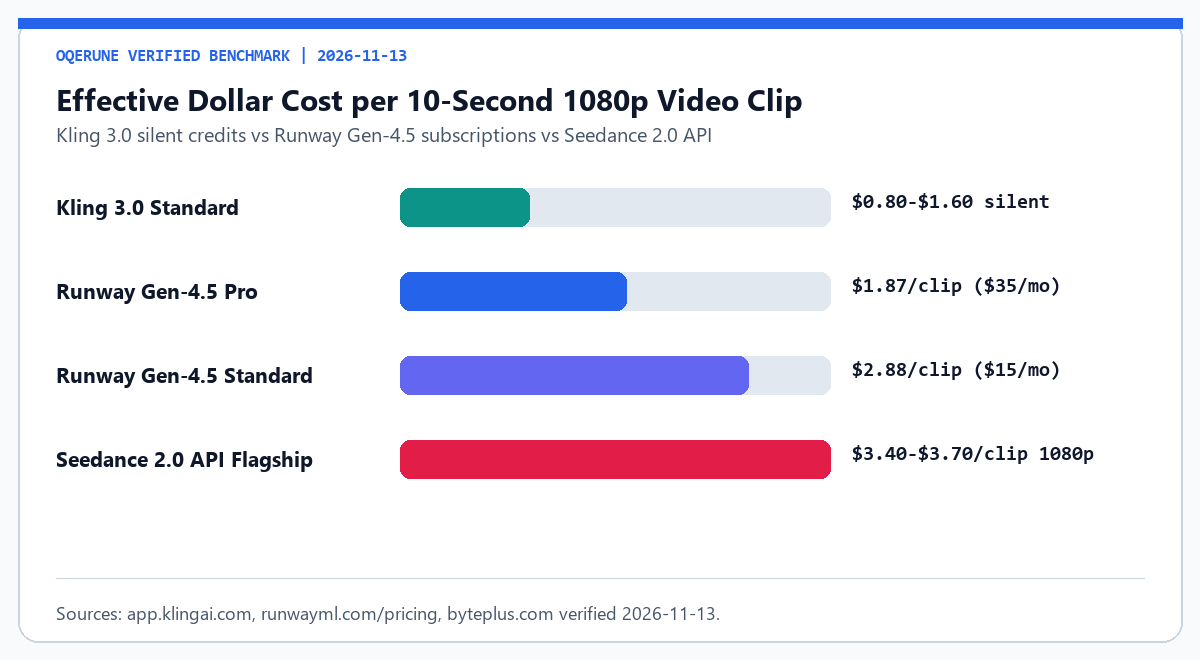
Whenever physics accuracy, 10-second 1080p shots, or multi-model selection matters, generating inside Canva burns Ultra monthly runs quickly, leaving little margin after a few prompt retries. Build raw footage inside Runway Gen-4.5, Kling 3.0, or Seedance 2.0 first, then drop clean MP4 exports onto your Canva timeline for captions and aspect-ratio crops.
Need presenter avatars or narration alongside video overlays? Check AI influencer generator pricing, compare Higgsfield vs Runway vs Kling, or estimate monthly render costs in the Oqerune cost calculator.
When you should skip Canva Pro for AI assets
Verification note: Canva US Pro ($18/mo monthly, $144/yr annual), Canva Business ($25/user/mo monthly, $20.83/user/mo annual), and 200 Premium / 20 Ultra AI ceilings were checked on 2026-11-13.
Skip paying $18/month purely to generate raw video scenes inside Canva. Pairing Canva Free for editing layouts with Kling AI Standard (~$8.80/mo) for B-roll and ElevenLabs Starter ($5/mo) for audio and Kling Standard (~$8.80/mo) for B-roll gives you dedicated credit accounting near $13.80/mo (or upgrade narration to Fish Audio Plus at $23/mo yr for ~600m) instead of hitting a shared 20-clip Ultra wall mid-campaign. Also check Murf Creator ($19/mo annual) if presentation slides drive most exports.
Frequently asked questions
Does Canva Pro include unlimited AI video clips?
No. Canva Pro ($18/mo monthly, $144/yr annual) caps heavy Magic Studio generation at shared monthly allowances (roughly 200 Premium or 20 Ultra AI runs covering video engines like Veo and Magic Media).
Why did Magic Media lock video generation on my Canva Free account?
Canva Free grants only a non-refreshing lifetime starter cap (~5 AI video runs) that does not reset each month like paid subscriptions.
Do failed Magic Media clips still count toward monthly caps?
Yes. Every completed video output draws down your Ultra/Premium monthly balance even if you discard the preview clip.
Is Canva Pro or Canva Teams/Business better for agencies?
Canva Pro ($18/mo monthly or $144/yr annual) strictly covers 1 person. Two or more collaborators needing shared brand approvals must buy Canva Business ($25/mo monthly or $20.83/user/mo annual at $250/yr).
What budget stack pairs well with Canva for social video ads?
Render raw scenes in Kling AI (~$8.80/mo) or Runway Standard ($15/mo), synthesize narration in ElevenLabs Starter ($5/mo) or Fish Audio, and combine captions cleanly in Canva.
Buy Canva Pro when visual layout speed and template resizing save hours each week, and pair it with dedicated engines reviewed under our testing methodology.
Verify current regional Pro pricing and video generation limits directly on the Canva pricing page before checkout.